Jul
2026
OmniSite Tech Tips
Issue
#24
IN THIS ISSUE
Configure OmniSite's P2P Control Table
API Connection Coming Soon
OmniAdvantage Plan
Plus Units
OmniComic
Configure OmniSite's P2P Control Table
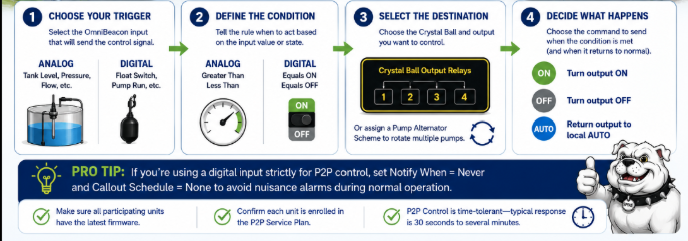
Configuring Your Peer-to-Peer Control Table
Peer-to-Peer (P2P) Control allows OmniSite units to communicate directly with one another—eliminating the need for complex PLC programming in many applications. Whether you're controlling a water tower, coordinating lift stations, or alternating pumps, P2P Control is configured using simple, easy-to-follow rules.
The Four Building Blocks of Every P2P Rule
When creating a new rule in GuardDog, think of it in four simple steps:
1. Choose Your Trigger
Select the station that will provide the control signal.
Decide whether you're using an Analog value (such as tank level or pressure) or a Digital input (such as a float switch or pump run status).
2. Define the Condition
Tell the rule when it should act:
Greater Than or Less Than (Analog)
Equals ON or OFF (Digital)
This determines exactly when the control command is sent.
3. Select the Destination
Choose the remote Crystal Ball and output relay you want to control. You can also assign a Pump Alternator Scheme if multiple pumps should rotate automatically for balanced runtime.
4. Decide What Happens
Configure what command is sent when the trigger becomes true—and what happens when it returns to normal:
ON / OFF places the output under remote control.
AUTO returns the output to local automatic operation.
⭐ Pro Tips
If you're using a digital input strictly for P2P control, consider setting Notify When = Never and Callout Schedule = None on that input. This prevents nuisance alarm notifications every time a normal operating cycle occurs.
Before You Begin
✔ Verify all participating OmniSite units are running the latest firmware.
✔ Ensure each unit is enrolled in the P2P Service Plan before creating rules.
✔ Remember that P2P Control is designed for time-tolerant applications. Commands are typically executed within 30 seconds to several minutes, making it ideal for applications like water tower pump control, pump alternation, and lift station interlocks—not processes requiring instantaneous response.
API Connection
In August, OmniSite will launch an API Connection, enabling you to link your existing SCADA system to our GuardDog platform. This will allow any local systems integrator to interface OmniSite OmniBeacon, XR50, Crystal Ball, or WINGs data and alarms with any existing or new SCADA platform, such as VTSCADA, Intellution, Wonderware, XylemView, or Ignition, on your next project. API stands for "application programming interface." More information will be available soon!
Benefits of the OmniAdvantage Plan
Get the most out of your plan
1
Lifetime Product Warranty
Lifetime Product Warranty ensures that you will never pay for an RMA, inspection or the price of shipping.
2
Emergency Stock
Our support team is available 24/7 to assist with any inquiries or issues, ensuring you get help whenever you need it.
3
Lifetime Radio Upgrades
As Technology changes and cell towers are updated causing connection issues, these radio kits are field replaceable at no cost to you!
Plus Units
The difference between classic units and plus units
OmniSite has infused innovation and passion into our product line. Though our classic units are no longer available, the new Plus units deliver unmatched reliability and durability. Curious about what sets our Plus units apart? Discover the key differences below:
- 24Vdc courtesy voltage. This allows the use of many two-wire 4-20mA devices without the need of a separate power supply.
- Over the air updates available for when bugs are fixed and new features are introduced.
- Improved power supply and improved isolation on analog inputs (Crystal Ball Plus) and all digital inputs.