
📌 Key Takeaways
Start replacing your weakest lift station alarm first — don't wait for a full system overhaul.
- Replace the Notification Path, Not Just the Light: A new alarm panel means nothing if no one gets a text, email, or call at 2 AM.
- Verify Cell Signal Before You Install: Cellular monitoring only works if the signal is confirmed on site — skipping this step leaves the station silent.
- Own Your Callout Lists: Staff change, shifts rotate, and weekends shuffle — if nobody updates who gets called, the alarm path quietly breaks.
- Use Reports to Spot Patterns: Pump runtimes, cycle counts, and alarm history turn emergency reactions into planned maintenance.
- Run New and Old Side by Side: Install modern monitoring alongside existing equipment, prove it works, then expand with confidence.
The best alarm upgrade is the one your team can test, trust, and manage without a specialist.
Municipal utility teams and lift station operators evaluating alarm replacements will find a practical starting framework here, preparing them for the detailed overview that follows.
~ ~ ~ ~ ~ ~ ~ ~ ~ ~ ~ ~ ~ ~ ~ ~ ~ ~
The alarm light still works. It blinks when it should. The old dialer checks in most mornings. But budget season has arrived, maintenance costs for legacy alarm infrastructure keep climbing, and one question nags at every utility team: Will the right person find out in time if a high wet well level, pump failure, or power outage hits at 2 AM during heavy rain?
Lift station overflow prevention planning is the larger goal. Replacing outdated alarms is one of the fastest ways to turn that plan into a practical, testable upgrade path. If a lift station alarm depends on someone standing nearby, a fragile communication path, or a system only one specialist can update, it should be evaluated for replacement. A modern overflow prevention setup should provide remote alerts, backup power, cellular connectivity, useful reporting, and a simple path to deploy alongside existing infrastructure.
The EPA identifies proper lift station maintenance and reliable notification as essential to reducing sanitary sewer overflow risk. Its collection-system CMOM guidance frames overflow prevention as a management, operation, and maintenance discipline — not a single-device decision.
This checklist helps identify which alarm functions still hold up, which have become single points of failure, and where a low-friction upgrade can reduce overflow risk — without tearing out the entire system.
Quick Checklist: Is Your Lift Station Alarm Ready for Replacement?
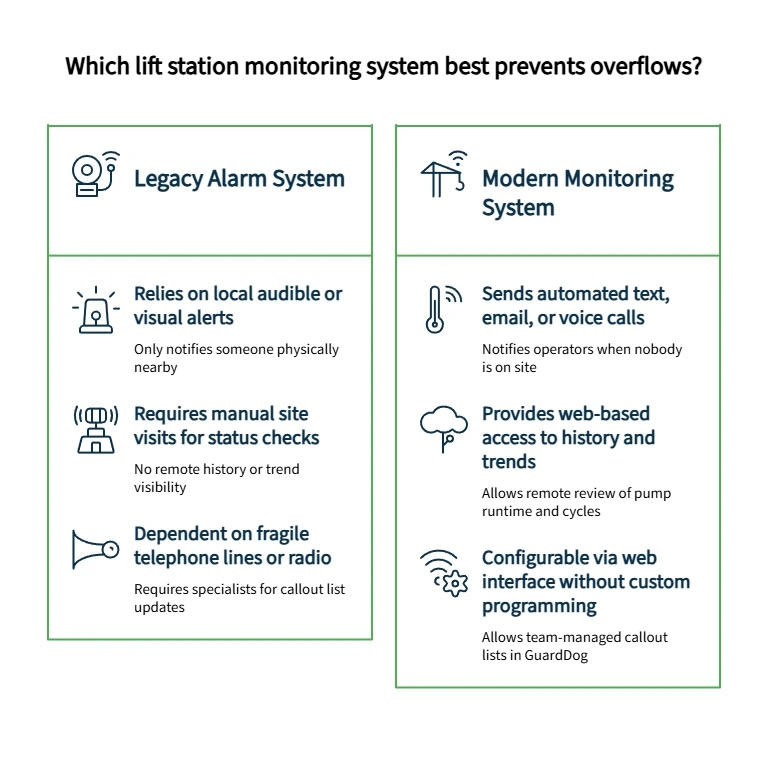
Walk your stations with these questions. Every unchecked box is a gap worth evaluating.
- ☐ Does the alarm notify operators by text, email, or voice call when nobody is on site?
- ☐ Does it report high wet well level conditions?
- ☐ Does it notify the team of pump failures or power outages?
- ☐ Does it continue monitoring during AC power loss?
- ☐ Can operators see alarm history without visiting the station?
- ☐ Can callout lists be updated without a specialist?
- ☐ Does the system provide pump runtime, cycle, or trend data?
- ☐ Can it be configured through a web-based interface — no custom programming?
- ☐ Does it avoid dependence on fragile telephone lines or private radio paths?
- ☐ Can it run beside existing infrastructure during the transition?
- ☐ Has the device activation path been planned before installation day?
- ☐ Can the team configure alarms, inputs, and callout lists in GuardDog?
- ☐ Can reports be exported for operations review or documentation?
- ☐ Does the system show alarm locations in a map view?
- ☐ Is training available for wiring, installation, activation, troubleshooting, or software operation?
- ☐ Is there a clear local representative or quote path for the project?
If the current setup only tells someone nearby that something went wrong, it is not enough for modern overflow prevention.
Old Alarm Approach vs. Modern Overflow Prevention Requirement
Outdated Limitation | Modern Requirement | Why It Matters | Vendor Question |
Local-only alarm light | Remote text/email/voice notification | No one may be at the station during an event | Who gets notified, how, and in what order? |
Telephone or radio dependency | Cellular or cloud-connected alerting, where signal is verified | Physical paths degrade and fail under stress | What happens if the legacy communication path goes down? |
No battery visibility | Backup power with low-battery alarm | Power loss is a common precursor to overflow | How long does the device monitor during AC power loss? |
No trend history | Pump runtimes, cycles, GPM, alarm history | Teams need patterns, not just emergency sirens | What reports come standard? |
Specialist-only changes | Browser-based configuration | Staff turnover should not freeze the system | Can the team update callout lists without a programmer? |
Hard-to-share reports | Exportable reports in common file formats | Budget and maintenance reviews lack documentation without them | Can reports be exported to Excel, Word, or PDF? |
Unclear station location | Map-based alarm view | Multi-site teams lose time orienting during emergencies | Can operators see which location is in alarm? |
Local alarm lights are simple and visible on site — a legitimate advantage where someone is always present. The gap is after-hours visibility. A red light flashing in an empty yard does not call the on-duty operator. Compare OmniSite product documents for the XR50 and Crystal Ball to see which monitoring path fits your stations.
What Modern Monitoring Actually Delivers
Remote Alerts That Reach the Right People
A modern lift station alarm should reach the right operator or on-call contact automatically — not depend on someone spotting a blinking light. That means configurable callout lists with escalation logic, supporting email, text, and voice call notification. OmniSite's GuardDog platform, accessible with an active cellular service plan, provides customizable callout lists, current alarm visibility, alarm acknowledgment, historical data, map view, and report exports from any browser or mobile device.
Overflow prevention is not only about detecting a condition. It is about closing the gap between detection and response. Ask one practical question: who owns the callout list when a technician retires, a shift changes, or weekend coverage rotates? If no one owns that update, the alarm path is already aging.
Backup Power and Communication During Outages
When AC power fails, the alarm system becomes part of the emergency response chain. A replacement should continue monitoring, report battery status, and notify operators before a local failure escalates. Cellular monitoring is a practical alternative to fragile hardwired paths — but no communication path should be treated as immune to failure. A replacement checklist should include activation, signal verification, antenna or location review, and realistic expectations for how installation quality, topography, weather, and carrier service may affect performance.
Useful Reports, Not Just Emergency Sirens
A siren tells the team something is wrong. Reporting helps the team understand what keeps going wrong. Modern lift station monitoring through solutions like the OmniSite XR50 can track pump runtimes, pump cycles, GPM, alarm history, and well inflow rates. GuardDog stores historical data for a specified retention period—ranging from six months up to five years, depending on your device and service tier—and supports one-click export to Excel, Word, or PDF.
That level of visibility turns reactive maintenance conversations into proactive ones. If one station shows longer runtimes after every 1.3-inch rain event, the team has something to investigate. If a pump cycles more often than expected, the data can guide the next inspection. Not drama — direction. Reporting intervals and feature availability may vary by plan or product configuration, so buyers should confirm which reports apply to the station being evaluated.
This kind of trend visibility also strengthens the budget case for continued investment.
Simple Setup Without Custom Programming
Low-friction does not mean no work. It means the work is understandable, repeatable, and manageable without turning every future edit into a programming project. OmniSite devices require no software installation. GuardDog is 100% web-based and accessible from any phone, tablet, or PC.
A practical replacement path should follow these planning checkpoints: activate the device, confirm cellular signal, log in to GuardDog, configure alarms and inputs, build callout lists, test notifications, and document who can make future changes. Teams that want help can use OmniSite's configuration services or attend free in-person product training at OmniSite's Indianapolis facility.
The Water Environment Federation describes lift stations as essential municipal sewer-system components that include pumps, valves, piping, electrical systems, and instrumentation control systems. That reinforces why replacement planning should include both the field equipment and the information path around it.
The Low-Friction Upgrade Path: Replace the Weakest Alarm First
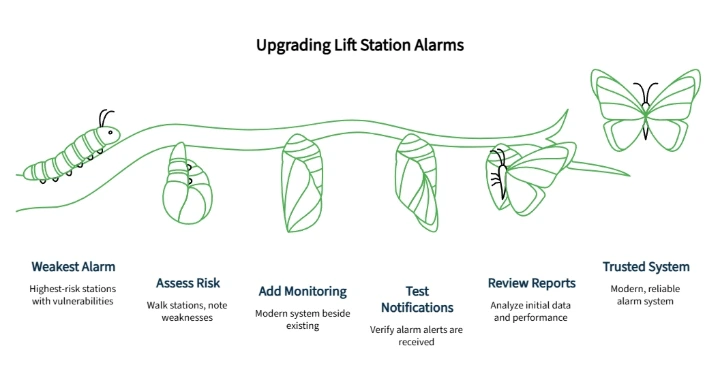
Start with the highest-risk stations where the consequences of an alarm failure are most severe. Walk each one with the checklist. Note communication weaknesses, power-loss vulnerabilities, missing reports, outdated callout workflows, and setup ownership gaps. Add modern monitoring beside the existing setup — not instead of it. Test alarm notifications. Review the first round of reports. Expand only after the team trusts the process.
You do not have to tear out the whole system to stop trusting the weakest alarm first.
This approach is especially useful for municipal teams that need budget confidence. It turns replacement from a broad capital argument into a measured operational pilot.
Before expanding, gather the product documents, data sheets, and warranty information needed for internal review. OmniSite's Quick Quote page connects the project with a local representative based on project location.
Common Mistakes When Replacing Outdated Alarms
Replacing the visible alarm but not the notification path. A new light at the panel does not help when nobody is on site at 3 AM. The notification path matters more than the device on the wall.
Skipping cellular signal verification. Cellular service must be confirmed before installation. Without adequate signal, the device cannot transmit alarms or data.
Wiring only the minimum alarm input. If pump runtime, cycle, level, or reporting features depend on specific inputs, those connections must be planned before installation day. The team will not receive the reports and functionality they expected if required wires, probes, or current switches are not connected.
Treating callout lists as a one-time setup. Staff change. Shifts rotate. Weekend coverage changes. Callout lists need to be living documents updated whenever the on-call roster changes. If no one owns that update process, the alarm path breaks silently.
What to Ask Before Approval
Before approving a replacement, confirm the system supports remote alerts, high wet well level monitoring, power failure notification, battery status visibility, alarm history, report exports, map-based alarm visibility, and team-owned configuration.
Then ask the practical questions: Who activates the device? Who verifies signal? Who configures alarms and inputs? Who maintains the callout list? What training is available? Can the system run in parallel with existing controls while the team proves reliability?
Your Next Step
Need help deciding which alarms to replace first? Request a Wastewater System Quick Quote to connect with a local OmniSite representative. Or explore OmniSite wastewater monitoring solutions and review product data sheets to start the comparison on your own terms.
Clear criteria. Incremental steps. Proven results before the next expansion.
Disclaimer: This article is for general informational purposes only. Lift station monitoring, electrical work, wastewater system compliance, and overflow prevention planning should be reviewed by qualified utility, engineering, electrical, and regulatory professionals for the specific site and jurisdiction.
Our Editorial Process:
Our expert team uses AI tools to help organize and structure our initial drafts. Every piece is then extensively rewritten, fact-checked, and enriched with first-hand insights and experiences by expert humans on our Insights Team to ensure accuracy and clarity.
About the OmniSite Insights Team:
The OmniSite Insights Team is our dedicated engine for synthesizing complex topics into clear, helpful guides. While our content is thoroughly reviewed for clarity and accuracy, it is for informational purposes and should not replace professional advice.