
📌 Key Takeaways
A strong overflow plan starts with one high-risk station, one clear alarm path, and one tested response loop.
Start With Risk: Choose the station most likely to cause harm, not the easiest one to upgrade.
Activate Before Install: Activate the device early so the crew avoids delays after mounting the unit.
Test Signal First: Check cellular signal before final mounting because weak signal can delay critical alarms.
Route Critical Alarms: Send high-water, power-loss, and signal alerts to the right on-call staff.
Validate Before Handoff: Trigger real tests and document results before calling the station live.
One tested station protects more than five half-finished upgrades.
Utility teams planning lift station monitoring will gain a clear launch path here, setting up the implementation guide below.
~ ~ ~ ~ ~ ~ ~ ~ ~ ~ ~ ~ ~ ~ ~ ~ ~ ~
The purchase order is approved. The decision is made. Now someone on the team is wondering: How complicated is this really going to get?
For utilities still running hardwired telemetry or aging SCADA systems, implementation has historically meant weeks of coordination, a specialist programmer, and a project that doubled in scope before anything went live. Modern cellular wastewater monitoring was built to change that. OmniSite was founded on the belief that protecting people and our planet — keeping sewage out of lakes and streams — should not require costly technical complexity. The first 48 hours of a lift station overflow prevention plan can be a controlled checklist instead of an integration project. Here is how.
Before the Clock Starts: Choose the Station That Cannot Be Blind
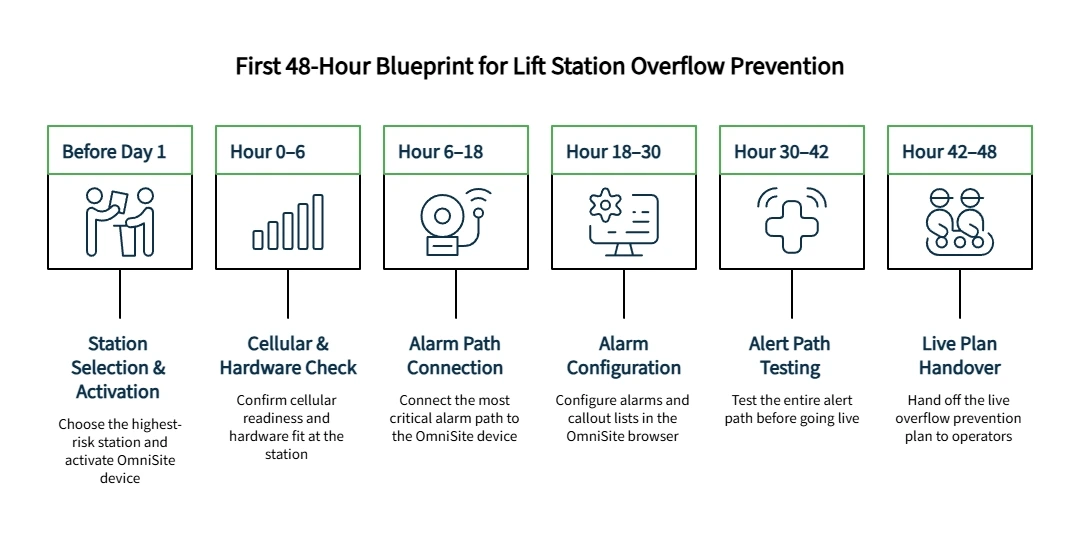
Start with the station that creates the most operational risk — not the most convenient one.
That may be the wet well with a high-water history. It may be the pump station with aging telemetry, difficult access, or a long response window. It may simply be the site that keeps showing up in morning conversations because everyone knows it needs better visibility. According to the EPA's sanitary sewer overflow overview and its collection and lift station maintenance guidance, equipment failures and inadequate maintenance are among the most common SSO contributors. Stations near waterways or with public exposure carry the highest consequence of an undetected failure. Risk profile, not convenience, is the deciding factor.
Before Day 1 starts, gather these inputs:
Station name and address or GPS coordinates
Critical alarm conditions
Current alert path and on-call contacts
Available power source
Unit ID for activation
Applicable product documents
Activation belongs here, not later. All OmniSite devices must be activated before they transmit alarms or data. Activate at omnisite.com/activate — processing can take up to one business day. OmniSite documentation recommends completing activation one to two days before installation. Discovering this after the unit is mounted is an avoidable problem.
OmniSite rapid installation kits for the Crystal Ball and XR50 arrive with wires, fittings, pre-terminated terminal blocks, and sealtite conduit in one box, along with an enhanced manual and access to remote GuardDog setup by OmniSite technicians.
The plan feels easier when the crew stops trying to modernize every station at once. One station. One alarm path. One validation loop.
Hour 0–6: Confirm Cellular Readiness and Hardware Fit
The first hours are about readiness, not rushing.
Confirm that the planned device fits the station's monitoring goal. The Crystal Ball is both a cellular pump station monitor and a backup pump controller — suited for stations that need monitoring plus pump control, analog data, and runtime history. The XR50 is a flexible cellular lift station alarm monitor that replaces telephone-line dependency with alerts by email, text, or voice call — well suited for monitoring digital alarm inputs and trend analysis without pump control requirements. Confirming this fit before installation avoids scope problems on site.
A cellular device also needs suitable signal before the installation should be treated as ready. Power the unit at the planned installation location and check the signal strength LED before mounting anything permanently. On the Crystal Ball, a green LED confirms the location is suitable. Resolve any signal issue before proceeding — antenna position, external antenna type, or mounting location may need adjustment.
OmniSite's cellular lift station monitoring replaces the legacy dependency on telephone lines and proprietary radio systems. The antenna must be mounted outside any metal enclosure — a phantom antenna on top of the panel connected via a coax jumper is a common, clean solution. Do not route antenna coax or low-voltage sensor wiring alongside high-voltage power or alarm horn wiring; high voltage can induce false signals on OmniSite inputs.
All electrical work requires qualified personnel. Review product documents before installation begins.
Hour 6–18: Connect the Alarm Path That Matters Most
The minimum viable launch is not every possible feature. It is the most important alarm path plus a verified response workflow.
Connect what must alert first. For most lift station overflow prevention work, that means high wet well level. Depending on the station and selected device, the launch may also include pump overload, pump runtime, power failure, signal strength, battery status, and communication check. High wet well level, power failure, and signal strength belong on a Critical Call Plan routed immediately to on-call staff. Communication-check and maintenance-key notifications may route to a non-critical list — but every alarm condition still needs a named owner.
A strong lift station alarm plan does not depend only on the alarm condition. It depends on what happens after the alarm appears. The alert must reach the correct people, the escalation order must make sense, and the acknowledgment process must be clear.
Avoid broad rewiring during the first 48 hours unless it is already part of the approved scope. OmniSite documentation is direct: cutting corners on connections prevents customers from receiving the advanced reports they were promised — and creates the monitoring gap that surfaces during a real alarm event, which is the worst possible time to discover it. Expanding wiring later is better than launching with uncertain assumptions.
Hour 18–30: Configure Alarms and Callout Lists in the Browser
This is where implementation anxiety usually drops.
"The first 48 hours should prove the plan is live, not prove that your crew needs a programmer."
GuardDog — OmniSite's cloud platform included at no extra software cost with an active cellular plan — runs in a standard web browser. No proprietary software, no code, no specialized programming skills required. Follow this four-step sequence:
Add recipients to the Recipient Library with at least two notification methods per contact: phone call, text/SMS, or email.
Create the Callout List — set contact order (position one is contacted first), configure retry count, and set the delay between attempts.
Create or assign a Callout Plan — map the Callout List to specific times and days for night, weekend, and holiday coverage.
Configure device alarms — set alarm state and Callout Plan per digital input. Configure general alarms for primary power, battery, signal strength, and communication check. Signal strength and power-loss conditions should route to the Critical Call Plan.
Save all changes before exiting.
Each contact should have the required notification methods configured. Do not assume the callout list works because the names are entered — confirm the full notification path.
Confirm station address or GPS coordinates are entered so the station appears correctly in GuardDog's map view. The GuardDog 2 mobile app extends alarm visibility, acknowledgment, and map view to any mobile device — useful for on-call operators away from a desktop.
Hour 30–42: Test the Alert Path Before Calling the Plan Live
Configuration is not completion. Validation is completion.
Work through this checklist before declaring the station live:
Trigger the alarm condition per approved site procedures
Confirm contacts receive the alert in the correct order via the correct methods
Confirm alarm acknowledgment works in GuardDog
Confirm the station appears correctly in map view
Confirm signal strength, power-loss, and battery status alarms are active and correctly routed
Confirm the communication-check setting matches the service plan and the right owner receives a missed-check notification
Document what was tested, when, and by whom
Signal strength deserves special attention. If cellular signal falls below an acceptable level, alarm delivery may be affected. Communication-check settings should also match the selected reporting plan and operating expectations.
When a superintendent asks how the team knows the system is working, that test record is the answer. After launch, routine battery and cellular signal checks should be a standing operational responsibility.
Hour 42–48: Hand Off the Live Plan to Operators
A launch is weak if only one person understands it. The handoff should be short, written, and easy to find.
Document: station monitored, device installed, alarm conditions configured and routed, callout list owner, backup escalation owner, report review frequency, next station candidate, and any known follow-ups. Also document which alarms are critical and which are non-critical — primary power, high wet well level, signal strength, and communication failure may need critical routing depending on site policy, while maintenance-key or enable/disable notifications may be non-critical, but they still need a named owner.
For teams wanting a deeper walkthrough, OmniSite offers free in-person product training at its Indianapolis facility — covering wiring, activation, troubleshooting, and GuardDog navigation — plus a GuardDog-focused webinar. Details are at OmniSite training. To involve a representative in quoting the next station or scoping installation support, Find Your Representative connects the team with a local OmniSite expert who can quote, install, and deliver units.
What Not to Do in the First 48 Hours
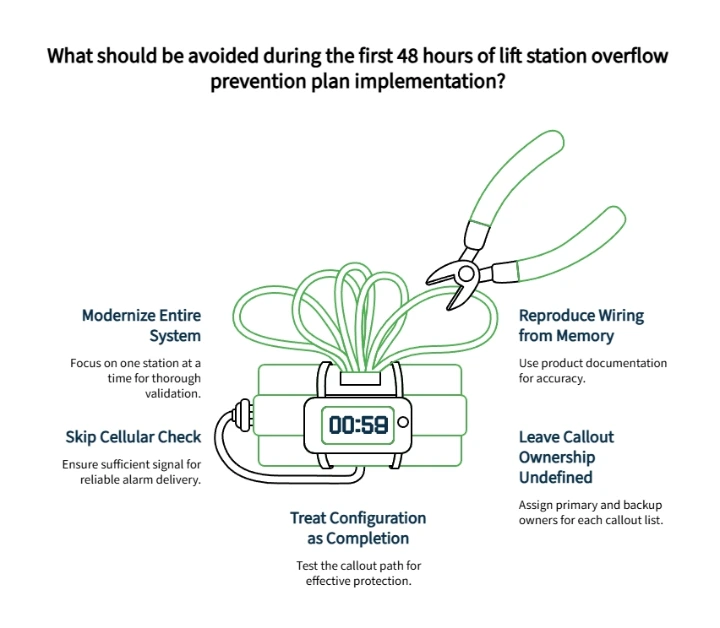
Do not try to modernize the entire collection system at once — one station properly validated is worth more than five stations half-configured. Do not skip the cellular signal check; a mounted unit with insufficient signal cannot deliver the alarms that justify the investment. Do not treat configuration as completion: an untested callout path is paperwork, not protection. Do not leave callout ownership undefined — every callout list needs a named primary owner and a named backup. Do not reproduce wiring from memory when product documentation is available.
Hardware mounted is not hardware installed. Wiring must be complete and correct before the system delivers what it was specified to provide.
This blueprint is a prioritization framework, not a universal installation timeline. Site complexity, access constraints, and activation timing all affect pace. Monitoring improves early warning and response readiness; it does not replace maintenance, qualified installation, or operator judgment. Review product documents and ensure qualified personnel handle all electrical work.
Related Planning Resources
For teams building the broader monitoring strategy alongside this launch: Replacing Outdated Alarms: A Checklist for Lift Station Overflow Prevention, How to Build a Fail-Safe Wet Well Monitoring Strategy in 3 Steps, and The Danger of Reactive Maintenance: Why Traditional Wastewater Redundancy Planning Fails.
Frequently Asked Questions
Can a lift station overflow prevention plan really start in 48 hours?
Yes — as a launch blueprint and prioritization window for the highest-risk station, not as a universal guarantee that every site is fully complete in exactly two days. Site conditions, access, and installation complexity all vary.
Do I need a programmer to configure a modern cellular monitoring system?
No. GuardDog is entirely browser-based. Field technicians configure alarm triggers, callout lists, and callout schedules without writing code or using proprietary programming software.
What should be tested before the plan is considered live?
At minimum: the alarm trigger, callout list order, escalation sequence, acknowledgment process, station map visibility, power-loss notification, battery status alarm, signal strength alarm, and communication-check configuration. Document what was tested, who performed the test, and what the outcome was.
Who should own the callout list?
Assign one named primary owner and one named backup. A callout list without a clear owner is a plan that may fail the first time an alarm arrives outside regular hours.
Ready to Launch the Plan?
If the team already knows which station cannot afford another blind spot, the next step is straightforward: get the right unit quoted and start the first 48 hours with a representative who understands municipal wastewater monitoring.
Get a Quick Quote — Share project location, station details, and product interest. The form routes directly to a local OmniSite representative who can confirm the right unit and installation path.
Find Your Representative — Connect with a local OmniSite expert for quoting, installation support, or product selection guidance.
Contact Us — For questions about products, services, or how to get started.
Disclaimer: This article is for informational planning purposes only. It is not a substitute for professional engineering, electrical, legal, regulatory, or safety advice. Lift station monitoring equipment should be selected, installed, configured, and maintained according to applicable codes, manufacturer instructions, site-specific requirements, and qualified professional guidance. Monitoring systems can improve visibility and response readiness, but they do not eliminate the need for regular maintenance, operator judgment, emergency planning, or regulatory compliance.
Our Editorial Process:
This content is developed from OmniSite strategy materials, OmniSite product and service documentation, wastewater monitoring use cases, and publicly available authority sources where appropriate. Drafts should be reviewed for technical accuracy, product-claim accuracy, link accuracy, and safety/compliance sensitivity before publication. Product specifications, prices, timelines, service terms, and installation details must be verified against current OmniSite documentation before the article goes live.
About the OmniSite Insights Team
The OmniSite Insights Team translates municipal monitoring, wastewater operations, and infrastructure resilience topics into clear, practical guidance for utility leaders and operations teams. Its content is reviewed for clarity, source alignment, and usefulness before publication.