
📌 Key Takeaways
Cellular SCADA monitoring gives utilities a practical way to replace fragile alarm paths without rebuilding everything.
Start With Risk: Upgrade the station with the weakest alarm path first, then expand after testing.
Keep Alarms Moving: Cellular monitoring sends alerts by text, email, or call when wired paths fail.
Test Before Trusting: Signal, wiring, battery backup, and callout lists must work before a station is protected.
Reduce Outside Dependence: Web-based tools help staff manage alarms and reports without constant specialist help.
Match The Device: Choose basic monitoring or backup pump control based on what the station actually needs.
Resilient monitoring starts with tested alerts, clear responsibility, and one smart station upgrade at a time.
Municipal wastewater and public works teams will gain a clear upgrade path here, setting up the implementation guide below.
~ ~ ~ ~ ~ ~ ~ ~ ~ ~ ~ ~ ~ ~ ~ ~ ~ ~
It is 3:00 AM on a rainy Saturday, and the phone will not stop ringing. A high-water alarm at a lift station never made it through, because the wired telephone connection carrying it was knocked out hours earlier by the same storm now flooding the streets. Nobody learns there is a problem until a resident calls to report water backing up into a yard. This widely recognized failure pattern is typically the catalyst for a utility to overhaul its telemetry. The harder question is what to change it to, and whether the fix is worth the disruption.
Cellular SCADA monitoring uses cellular networks and cloud-based software to deliver alarms, status changes, and operational data from remote stations to the people responsible for responding, in place of the single fragile communication path that hardwired telemetry depends on. A useful way to picture the shift is upgrading from an old landline to a rugged, always-connected smartphone for municipal infrastructure: the basic job is the same, staying in touch with a remote location, but the underlying connection is built for a world where it actually has to hold up. Imagine a superintendent checking a pump station's status from a tablet at home and seeing a power-failure alert the moment it happens, rather than hearing about it from a neighbor the next morning. That is the practical territory this guide covers: not a full SCADA rebuild, but a realistic evaluation of cellular monitoring as a replacement or augmentation path when phone-line or radio-based telemetry is failing and a fully engineered control system feels like overkill.
What Cellular SCADA Monitoring Actually Means
The term SCADA gets used loosely across the water and wastewater industry, and that looseness is a common source of confusion. Traditional SCADA typically implies a broader engineered control architecture built from programmable logic controllers, dedicated radios, servers, historians, operator workstations, custom screens, and software developed or maintained by a systems integrator. Cellular SCADA monitoring, as covered here, is narrower and more specific: it uses cellular telemetry and cloud-based software, sometimes described as cloud-based SCADA, to deliver alarm visibility, reporting, trend data, callout workflows, and in some cases backup pump control, without that engineered overhead. A device built around this approach functions as a wireless lift station monitor first, with the optional ability to step into a backup control role when the situation calls for it.
That distinction is not a minor technicality. It marks the boundary of what this guide is actually claiming. It is not suggesting that cellular monitoring replaces every engineered SCADA system in a collection network. A large treatment plant running complex process control will generally still need a true SCADA architecture, and nothing here argues otherwise. For the specific pain that drives most lift station upgrade conversations, namely losing alarm visibility, struggling with inconsistent reporting, or needing outside help for every minor adjustment, cellular monitoring addresses the problem directly rather than as a workaround. A utility does not need a full SCADA rebuild just to know whether a station has a high wet well level, a power failure, a pump failure, weak cellular signal, excessive runtime, or a missed reporting window. It needs a maintainable remote monitoring path its own operations team can actually use.
It is worth being equally direct about what the concept is not. It is not a claim that every wired telephone connection or radio system in service today is obsolete, and it is not a promise that a cellular device eliminates the need for proper setup. OmniSite frames its own positioning around removing programming dependency, describing its cloud-connected devices as not requiring custom software development or complex control panel construction. That is a fair description of the day-to-day experience a well-configured system should deliver, but it assumes the underlying installation work, covered later in this guide, has actually been done correctly.
The Landline-to-Smartphone Upgrade
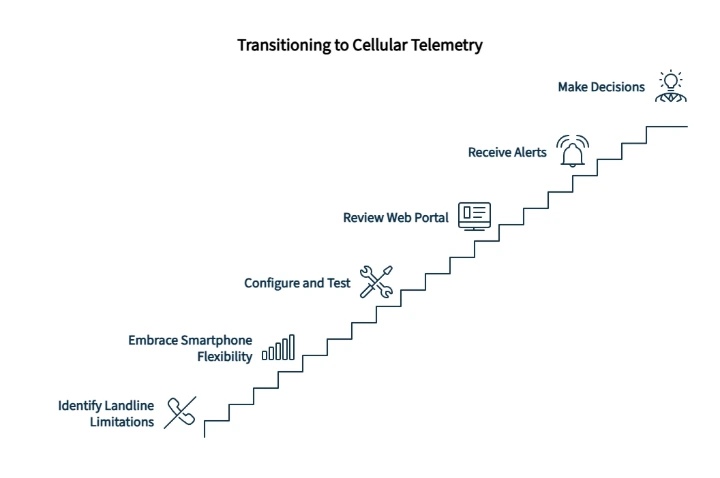
A landline can work well right up until the line is damaged, the support path disappears, or nobody can explain why an alarm did not travel. A rugged smartphone is not magic either. It still needs power, signal, configuration, and testing. What it offers instead is a more flexible way to communicate, check status, receive alerts, and make decisions, and that is the right mental model for cellular telemetry. The comparison is not "old equals bad" and "new equals perfect." It is a shift from a rigid, single-path communication model to a more flexible, testable, web-accessible one.
In a wastewater setting, that shift changes the daily operating rhythm. Instead of waiting for a hardwired path or a specialized terminal to reveal a problem, operators can review station condition through a web portal, receive alerts by text, email, or voice call, and use configurable callout lists to route alarms to the right people in the right order. Cellular telemetry enables that kind of lift station visibility without custom programming in many common monitoring workflows. That does not mean installation disappears or that activation becomes effortless. It means the operating model can become more manageable for the lean teams who actually have to run it day to day.
Why Hardwired Telemetry Becomes a Headache
Most utilities did not choose hardwired telemetry because it was elegant. They chose it because, at the time, it was the available option, and it worked reasonably well until it did not. A handful of patterns show up repeatedly in the field, and most operators will recognize at least one of them. The communication path often depends on aging phone lines or radio infrastructure that nobody specifically budgeted to maintain. A routine configuration change, something as simple as adjusting a pump alternation delay, can require bringing in outside help because the legacy terminal interface is too specialized for in-house staff to touch confidently. Routine setpoint adjustments routinely run upward of a hundred dollars an hour when reliant on specialized third-party programmers. Manual site checks quietly become the backup plan for unreliable remote visibility, which is really just a polite way of saying someone has to drive out and look at a panel because nobody fully trusts the alarm to fire. Storms tend to expose the weak point in the whole system at the worst possible time, right when staff are already stretched thin responding to other emergencies.
The frustration is rarely just technical. It is workload. Picture an operator standing in front of a complex SCADA terminal, trying to make a change as small as a pump alternation delay. The screen looks like it was built for whoever originally programmed it rather than for the person standing in the station right now. The only real option left is calling a third-party programmer for a change the team wishes it could handle directly. That scene, more than any single statistic, is what eventually pushes a utility toward a different telemetry model.
None of this means a utility made a poor decision years ago. It means the dependency that built up around the legacy system deserves more sympathy than it usually gets, and the fear of disruption that keeps teams from modernizing is not irrational. A full rip-and-replace SCADA project is genuinely expensive and genuinely difficult to schedule around a working collection system.
A Low-Friction Modernization Path
The more useful framing is not "replace everything now" versus "live with the risk indefinitely." Cellular telemetry can be introduced one station at a time, and in many cases it can run in parallel with an existing system rather than forcing an immediate cutover. A utility might add cellular monitoring to its highest-risk station first, validate that the new alarm path performs as expected alongside the legacy system, and only then expand the approach to additional stations as confidence builds. That staged path reduces the perceived downtime and implementation anxiety that typically stall modernization conversations before they start. For a closer look at how unreliable alarm paths compound into larger maintenance problems over time, see the case for moving past reactive maintenance.
When Cellular SCADA Monitoring Is a Fit
Cellular SCADA monitoring fits best when the underlying problem is remote visibility rather than a full control-system redesign. It is a strong candidate when a team needs to replace a fragile phone-line or radio-based alarm path, add a lift station alarm path that reaches staff by text, email, or voice, or improve lift station monitoring with clearer access to alarms, runtime data, and trends. It also fits when a utility wants a cellular pump station monitor for station-level visibility, or a cloud-based wastewater monitoring system without building custom software in-house. For utilities evaluating monitoring needs beyond lift stations specifically, the same underlying cellular and cloud-based approach generally extends to remote water flow monitoring and broader water level monitoring across a wider system.
It will not fit every station in the same way. A large treatment plant with complex process control may still require a full engineered SCADA architecture, while a remote lift station with a fragile alarm path may need a simpler, more maintainable monitoring path first. That is the staged modernization logic in practice: start where the risk, frustration, or communication weakness is clearest, and let device selection follow from what actually needs to be measured and what kind of response an alarm needs to trigger.
Cellular vs. Hardwired Telemetry: The Reference Guide
This table is built to function on its own, independent of the surrounding article, so it can be saved, printed, or shared with a colleague who needs the short version, or used as a discussion tool with operations, management, procurement, and technical stakeholders.
Decision Factor | Hardwired / Legacy Telemetry Concern | Cellular SCADA Monitoring Advantage | What to Verify |
|---|---|---|---|
Communication path | Depends on a wired phone connection or radio path vulnerable to storm damage and aging infrastructure | Uses local cellular networks instead of a single fixed line | Usable cellular signal at the specific station |
Installation friction | Often tied to existing wiring runs and legacy panel layouts, and upgrades can feel tied to large SCADA projects | Devices such as Crystal Ball, a cellular pump station monitor, are designed for installation in roughly four hours with basic wiring knowledge, and can support staged modernization at one station at a time | Site-specific wiring, available panel space, and whether the goal is alarm visibility, reports, trends, or backup control |
Alarm delivery | A single path; failure of the line means failure of the alarm | Delivers alerts by email, text, and voice call | Whether call lists are current and tested against real recipients |
Reporting and history | Inconsistent reporting, often dependent on manual checks, with limited historical retrieval | Reporting on a regular cadence, with cloud-based history, trend review, and exportable reports available | Reporting cadence that matches the utility's risk tolerance and service plan |
Remote access | Usually requires being on-site or dialing into a proprietary terminal | Web-based access from a computer or mobile device | Staff comfort with a web interface versus a legacy terminal |
Configuration changes | Frequently requires bringing in specialized outside help | Configured through a standard web browser | What still genuinely requires a professional, versus what staff can adjust directly |
Maintenance burden | Old lines, radios, and proprietary interfaces become harder to support over time | Reduces dependence on hardwired communication paths | Documented backup procedures and clear support responsibilities |
Backup power | Varies widely between sites, often undocumented | An internal backup battery is intended to maintain monitoring through short outages | Expected backup runtime for the specific device and site conditions |
Cybersecurity posture | Often an afterthought in older installations | Built around configuration discipline, access control, and update practices | The utility's own access policies and update cadence |
Operator training and handoff | Knowledge often sits with one vendor or one employee | Vendor-provided training can make the workflow easier to hand off to in-house staff | Whether staff have completed training on activation, alarms, acknowledgement, and testing |
Buying path | Procurement often depends on engineering scope and vendor coordination | Late-stage buyers can use representative-supported quote paths | Use Quick Quote or Find Your Representative once the project is ready |
The table is not a verdict that cellular is always the right answer. It is a practical way to compare failure modes, maintenance effort, and operating control, station by station.
What to Verify Before Trusting Any Remote Monitoring Path
A handful of practical checks separate a dependable deployment from a shaky one, and they apply regardless of which device a utility eventually chooses. Confirming usable cellular signal at the installation site comes first, before any other commitment is made to that location. Antenna placement matters more than it might seem: routing antenna coax separately from high-voltage cables and alarm horn power wires, and avoiding mixed high- and low-voltage wiring inside the control panel, helps prevent false signals or unpredictable behavior. Correct device activation and proper wiring for the specific alarms and values a team expects to see are just as important as the device itself, since correct sensor, current-switch, probe, and transmitter connections are what actually make advanced reporting possible. Battery backup expectations should be documented for the specific outage durations the station is likely to face. Communication-check settings, which confirm the device is still reporting in on a regular schedule rather than failing silently, are easy to overlook and worth configuring deliberately. Alarm delivery should be tested against real recipients rather than assumed to work simply because the installation went smoothly, and the question of who receives each alert, who acknowledges it, and what the escalation path looks like deserves a written answer, not an informal understanding.
The Reliability Question: Will Cellular Work When It Is Needed Most?
This is the objection that should be raised, and the honest answer is not that cellular is flawless. It is also not that hardwired telemetry was flawless, which is easy to forget once the conversation gets framed as old versus new. The more productive evaluation is which path gives a specific station the most practical, testable alarm visibility, given its location, budget, and staffing reality.
Cellular telemetry is generally understood to be a more resilient communication link than a single wired connection, including during severe weather events, because it does not depend on one physical line running through a flooded or storm-damaged area. That said, no communication method, cellular or hardwired, can guarantee uninterrupted service during every emergency, and a tested escalation plan and backup battery matter precisely because of that limit.
On the cybersecurity side, the right framing is a set of practices rather than a single reassuring word. Legacy does not automatically mean secure, and cloud-based monitoring does not automatically mean insecure; security depends on how a system is configured, governed, updated, monitored, and used. Operational technology carries a different risk profile from ordinary office IT, and the National Institute of Standards and Technology's SP 800-82 guidance addresses operational technology security in a way that explicitly accounts for the performance, reliability, and safety requirements unique to control systems, rather than treating operational technology like a standard office network. The Cybersecurity and Infrastructure Security Agency's recommended practices for industrial control systems offer concrete guidance on common vulnerabilities and mitigation steps. Because this guide is specifically about water-sector infrastructure, the EPA's cybersecurity resources for the water sector are built around the kind of basic cyber hygiene that genuinely helps a utility with limited IT staff, including access control, patching, and incident response planning, rather than abstract policy language. For municipal wastewater teams, the practical question is posture rather than buzzwords: who has access to the monitoring platform, how users are added and removed, how alarm acknowledgements are logged, and how the utility responds if communication fails all matter more than whether a system happens to be described as "cloud-based."
As for the cellular network itself holding up during a regional emergency, the Federal Communications Commission's work on wireless network resiliency during disasters describes ongoing carrier-level efforts to improve reliability, though it stops short of promising uninterrupted service in every scenario, and so does this guide.
How Cellular SCADA Monitoring Puts Control Back in Operators' Hands
The frustration behind most legacy SCADA headaches is rarely about the technology itself. It is about dependency. When every adjustment requires a phone call to a specialist, the team closest to the station has the least ability to act on what it is seeing, which runs counter to the basic goal of remote monitoring in the first place.
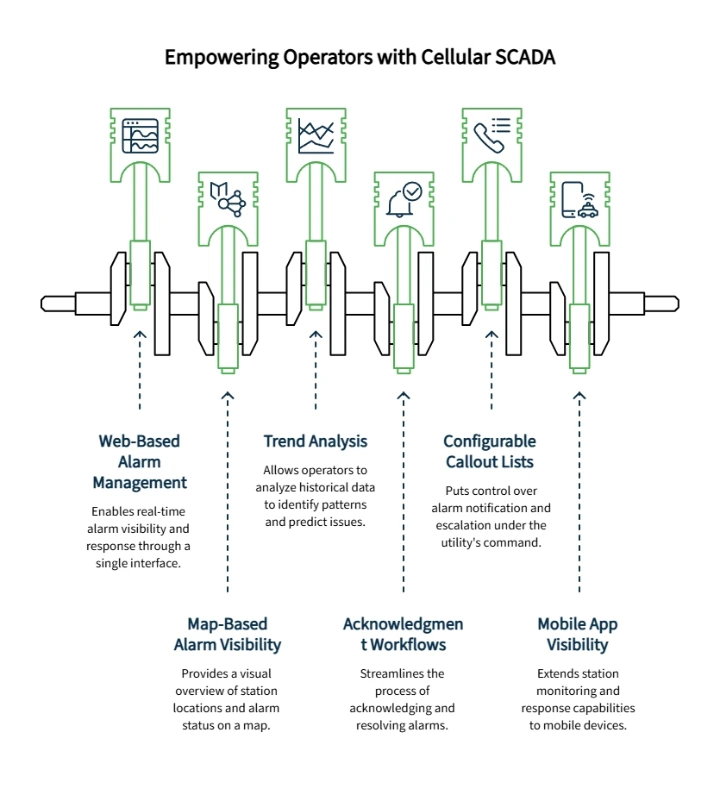
OmniSite's GuardDog software is built to close that gap. It enables web-based alarm management, map-based alarm visibility, trend analysis, and acknowledgment workflows from a single interface, included with an active wireless service plan, so staff can view current station status and respond to alarms without routing every interaction through a third party. Configurable callout lists determine who is notified, by what method, and in what order, which puts the escalation path under the utility's own control rather than leaving it as something inherited and rarely revisited. A companion mobile app extends some of that same visibility to a phone, though a few of the more advanced app features are reserved for customers on OmniSite's optional support plan rather than included with every account.
This does not mean anyone with a login can configure everything on day one. It means the ongoing dependency shifts from an outside specialist toward a documented, supported workflow that a utility's own staff can learn, particularly when paired with the wiring and activation training a vendor like OmniSite typically provides during onboarding.
Where OmniSite Fits: XR50, Crystal Ball, and GuardDog
The right device generally follows from how much visibility a station actually needs, rather than from chasing the most advanced option available. A station that primarily needs basic alarm monitoring and trend visibility is usually well served by XR50, which monitors digital alarm inputs and tracks pump runtime, cycles, and trend data through GuardDog. It can support the move away from hardwired alarm dependence while keeping the focus on alarms, runtimes, cycles, and flow-related visibility.
A station that needs pump station monitoring in addition to backup pump control is a better fit for the Cellular Pump Station Monitor, more commonly known as Crystal Ball, which adds well level tracking, high and low alarms, power failure detection, and pump amp draw monitoring to that same backup control capability. When fully wired, Crystal Ball Plus can also support drawdown tracking, total station flows, pump cycles and runtime, pump failure detection, backup pump control driven from well level, rainfall data where connected, cellular signal strength reporting, notification history, historical logs, graph and export capability, and low backup battery alarms. Crystal Ball Plus specifically is configured through a standard web browser rather than proprietary programming software, consistent with the broader positioning described above, though that ease of configuration still depends on the underlying wiring being completed correctly, since advanced reports and features only function once the required wires, current switches, and sensors are actually connected.
GuardDog itself sits above either device as the software layer responsible for alarms, callout lists, historical logs, trend review, and exportable reports. For utilities comparing adjacent water and wastewater applications, OmniSite's broader product set also includes well pump monitoring and related pump monitoring systems, worth a look only where they actually match the application at hand rather than as a default upgrade path.
What to Have Ready Before You Treat a Station as Protected
Cellular and cloud-based monitoring reduces complexity, but it does not remove responsibility. Before treating a station as covered, a utility should be able to confirm usable cellular signal at the exact installation location, correct device activation, and proper wiring for every alarm and value the team expects to see. Antenna placement, sensor and current-switch connections, and an accurate callout list all belong on that same checklist. None of this is exotic, but skipping it is what turns a well-installed device into a false sense of security: a device cannot report what was never wired, and a callout list cannot notify someone who was never added to it.
How to Start Without the Headache
Modernizing telemetry does not have to mean a single, high-stakes go-live date. A staged approach applied to one high-risk station first tends to build the kind of internal confidence that makes expanding the approach to additional stations a much easier conversation later. The process generally starts with identifying the lift station carrying the most fragile alarm path or the worst service history, since that is where an upgrade pays off fastest. On day one, that means confirming cellular signal, documenting current power and battery assumptions, reviewing antenna placement, and noting exactly which wires, current switches, probes, or transmitters would be needed to support the reports the team actually wants.
Day two is about workflow rather than hardware. Mapping the callout chain accurately, deciding exactly who is notified, by what method, and in what order, matters more than it might seem, since an outdated or informal list undermines even a well-installed device. Deciding what counts as a critical alarm versus a routine notification belongs in this same conversation. Once those fundamentals are settled, choosing between a device focused on alarm and trend visibility versus one that adds backup pump control becomes a much more straightforward decision.
The final step, easy to skip under time pressure but difficult to recover from if skipped, is actually testing alarm delivery before treating the station as protected, alongside confirming staff have completed the vendor-provided training on wiring, activation, and the GuardDog interface that most reputable vendors include as part of onboarding. A good first station should become a repeatable model for the next one, not a one-off experiment. For related planning, see the first 48-hour blueprint for launching a lift station overflow prevention plan, how to spot impending lift station failures in pump data trends, a checklist for replacing outdated alarms, and the case for moving past reactive maintenance.
Your Path to a More Resilient Lift Station
Return for a moment to the landline-and-smartphone comparison. Nobody upgrades a phone system because the old one technically still makes calls. The upgrade happens because the new system stays connected when it actually matters, with far less specialized maintenance running quietly in the background. That is the realistic case for cellular SCADA monitoring: not that every traditional system is obsolete, but that a fragile, specialist-dependent communication path is a real and fixable liability for a team that cannot afford an undetected failure.
A decision to evaluate cellular monitoring today is also, in a practical sense, a foundation for where most utilities are already heading: a more data-driven, remote-first operating model built on tested alerts and trend data rather than manual site checks and single-path assumptions. That shift tends to happen one station at a time, and there is no requirement that it begin with the most disruptive option on the table.
For utilities trying to determine whether cellular SCADA monitoring fits a specific lift station setup, the most useful next step is usually a conversation rather than a purchase decision. Contact OmniSite to talk through a specific situation, or for utilities that already have an active project underway, a Quick Quote request or a direct conversation with Find Your Representative is the more direct path forward.
Disclaimer: This article is for general educational purposes only and should not be treated as engineering, electrical, cybersecurity, regulatory, or legal advice. Cellular coverage, alarm delivery, backup power, configuration, and monitoring performance vary by site conditions, installation quality, carrier availability, service plan, and system setup. Cellular signal must be checked at the installation location, and proper wiring and antenna placement matter. Electrical work should follow applicable codes and qualified guidance, and advanced reports or features depend on correct wiring and connected inputs. Utilities should follow applicable codes, manufacturer instructions, cybersecurity policies, and qualified professional guidance before installing or modifying monitoring or control equipment.
Our Editorial Process:
OmniSite content is drafted from approved OmniSite source materials, reviewed for factual accuracy against product documentation and current website pages, checked for unsupported technical or quantitative claims, and edited for clarity for municipal wastewater and public works readers. Any claim involving safety, cybersecurity, reliability, warranty, pricing, reporting cadence, or technical specifications is traced to an approved OmniSite document or an authoritative external source.
By the OmniSite Insights Team
OmniSite manufactures control systems that help protect people and the planet by supporting municipal infrastructure monitoring for lift stations, water systems, wastewater systems, and airfield lighting, with a mission centered on protecting waterways, drinking water, and public safety through early warning of equipment issues.